Author: Laura Blazquez

Learning When to Move Forward in 3D Production

Perfectionism is often associated with quality, but in a production environment it can become counterproductive.
For a long time, I believed that doing a good job meant refining every detail as much as possible before moving on. Through working on real projects and full pipelines, I learned that quality in production is not about endless polishing, but about understanding when a task is ready to move forward without compromising the overall process. 

This post reflects on that shift and how it changed the way I work.


The Real Problem Behind Perfectionism

In 3D production, perfectionism rarely looks like excellence. More often, it shows up as hesitation, over-control or difficulty letting a task go.

Early on, I associated professionalism with pushing every asset or shot to its absolute limit. I wanted everything to be flawless before letting it go. The problem is that production doesn’t work in isolation. Every task is connected to the next one, and slowing down one step often affects the entire pipeline.

Perfectionism, when unmanaged, doesn’t protect quality. It delays decisions, blocks iteration and creates unnecessary pressure for both the artist and the team.


Early Signs That Something Wasn’t Working

Over time, I started noticing situations where I was:

  • Spending too long polishing elements that would barely be visible in the final shot
  • Hesitating to move forward because something felt “not perfect yet”
  • Reworking details without a clear production reason
  • Feeling mentally stuck even when the technical work was correct

The biggest change came when I stopped asking “Is this perfect?” and started asking “Is this doing its job?”

Instead of refining endlessly, I began to evaluate my work based on clear criteria:

  • Does this asset work correctly in the scene?
  • Is the topology, scale and structure reliable for the next steps?
  • Will further polish actually improve the final result, or just consume time?

This shift didn’t mean lowering standards. It meant aligning quality with purpose. Understanding that not every task requires the same level of refinement helped me make decisions faster and with more confidence.


Pipeline Awareness and Real Production Impact

Once I started working this way, the difference was noticeable not only in my own workflow, but in how my work fit into the broader pipeline. Deadlines felt more realistic, not because I rushed, but because I understood where my time had the most impact.

From a production point of view, this balance is essential. A task that is well prepared, reliable and delivered on time supports the entire team. A task that is overworked too early, even if visually strong, can become a bottleneck.

Understanding when something is “production-ready” rather than “personally finished” is a skill that directly affects the health of a project.


What Other Artists Can Take From This

Especially at the beginning, perfectionism often comes from caring deeply about the work. That care is valuable, but it needs direction.

What helped me most was learning to define the objective of each task before starting, understanding what level of finish was actually required at that stage, and accepting iteration as a normal part of the pipeline rather than a sign of failure.


A Personal Reflection

I still care deeply about detail, mood and visual quality, but I now approach them with a clearer sense of timing and purpose. That shift has made my process healthier and my decisions more confident.

In professional production environments, progress and quality are not opposites. They depend on each other. Knowing when to move forward responsibly allows projects to evolve, teams to trust the process and ideas to improve through collaboration rather than stagnation.

You can see how this approach translates into my projects through the detailed case studies in my portfolio.

My Base Setup Before Starting Any 3D Project

When starting a new project, it’s tempting to jump straight into modeling, texturing, or whatever part feels most exciting. I used to do the same.
Over time, especially through collaborative projects and production-based work, I realized that many of the problems that slow a project down don’t come from the creative work itself. They come from poor organization, unclear structure, and technical decisions that weren’t considered early enough.

What once felt like “saving time” often ended up creating more work later.

This is why I now spend time setting up a project before creating any assets. It may seem like a small step, but it has a huge impact on how smoothly a project develops from start to finish.


Why projects slow down earlier than expected

Most projects don’t become messy overnight. It usually starts with small shortcuts: an object that isn’t named properly, a temporary folder structure, a file version that never gets cleaned up. None of these decisions seem important in the moment. The problem appears later, when the project grows.

During collaborative projects and short films, I’ve seen how unclear organization can make even simple updates harder than they need to be. Finding the correct file, understanding someone else’s scene, or making changes without affecting other elements becomes slower and more frustrating than the actual creative work.

Good structure doesn’t remove problems, but it makes them easier to solve.


How I prepare a project before creating assets

Before I start building anything, I take time to prepare a base structure that will support the project from start to finish.

Clear Structure and Naming

One of the first things I establish is a consistent organization system.

This includes:

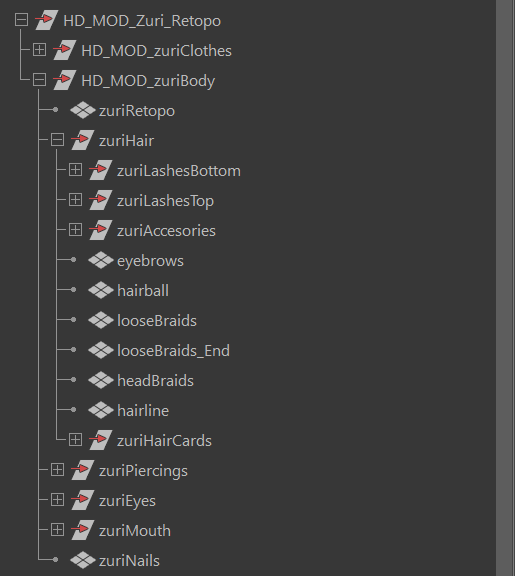
  • Logical asset grouping
  • Clean scene hierarchies
  • Clear naming conventions
  • Organized project folders

The goal is simple: anyone opening the project (including my future self) should be able to understand it quickly. A well-structured scene makes updates easier, reduces mistakes, and keeps production moving efficiently as complexity increases.

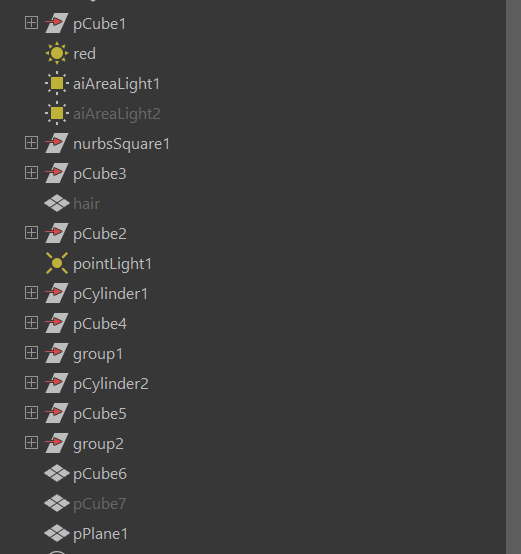
For teams, this clarity is essential. For solo work, it is what keeps the project manageable weeks later when you don’t remember what “cube67” was for.

Technical awareness without over-optimizing too early

At this stage, I’m not trying to optimize everything. Instead, I focus on creating a setup that can adapt as the project evolves.

Working primarily on character-focused projects during my Master’s degree taught me how often things change throughout production. Designs evolve, proportions shift, assets need revisions, and new requirements appear unexpectedly. A flexible setup makes those changes manageable.

Why this matters in production environments

This way of working has proven especially valuable in collaborative projects and real productions.

A solid base setup directly affects how reliable a file is when handed over to someone else. Clean structure, readable scenes, and predictable organization reduce the risk of errors and save time for everyone involved. The setup itself is not visible in the final render, but its impact is felt throughout the entire production.


What other artists can take from this approach

You don’t need an elaborate pipeline or a complex system to benefit from this mindset. The most important habit is simply thinking about the project beyond the current task. And whether another artist could work with that file easily.

These habits compound over time. And each project becomes easier to manage than the previous one.


Final thoughts

Earlier in my learning process, I was focused on finishing pieces as quickly as possible. With experience, especially after working on team-based productions, I understood that speed comes from preparation, not from skipping steps. Now, taking time to set things up properly helps me work with less stress, adapt more easily to changes, and enjoy the process more.

You can see how this approach is applied in my projects through the detailed breakdowns in my portfolio.